📋Table of Contents
Hello everyone! Welcome back to word.rean.me by Rean Computer 101!
When you type Khmer Unicode in Microsoft Word or on Facebook, do you ever get stuck trying to type special independent vowels (ស្រៈពេញតួ) like ឫ, ឬ, ឭ, ឮ, ឯ, ឱ, ឳ or rare characters like ឝ, ឞ?
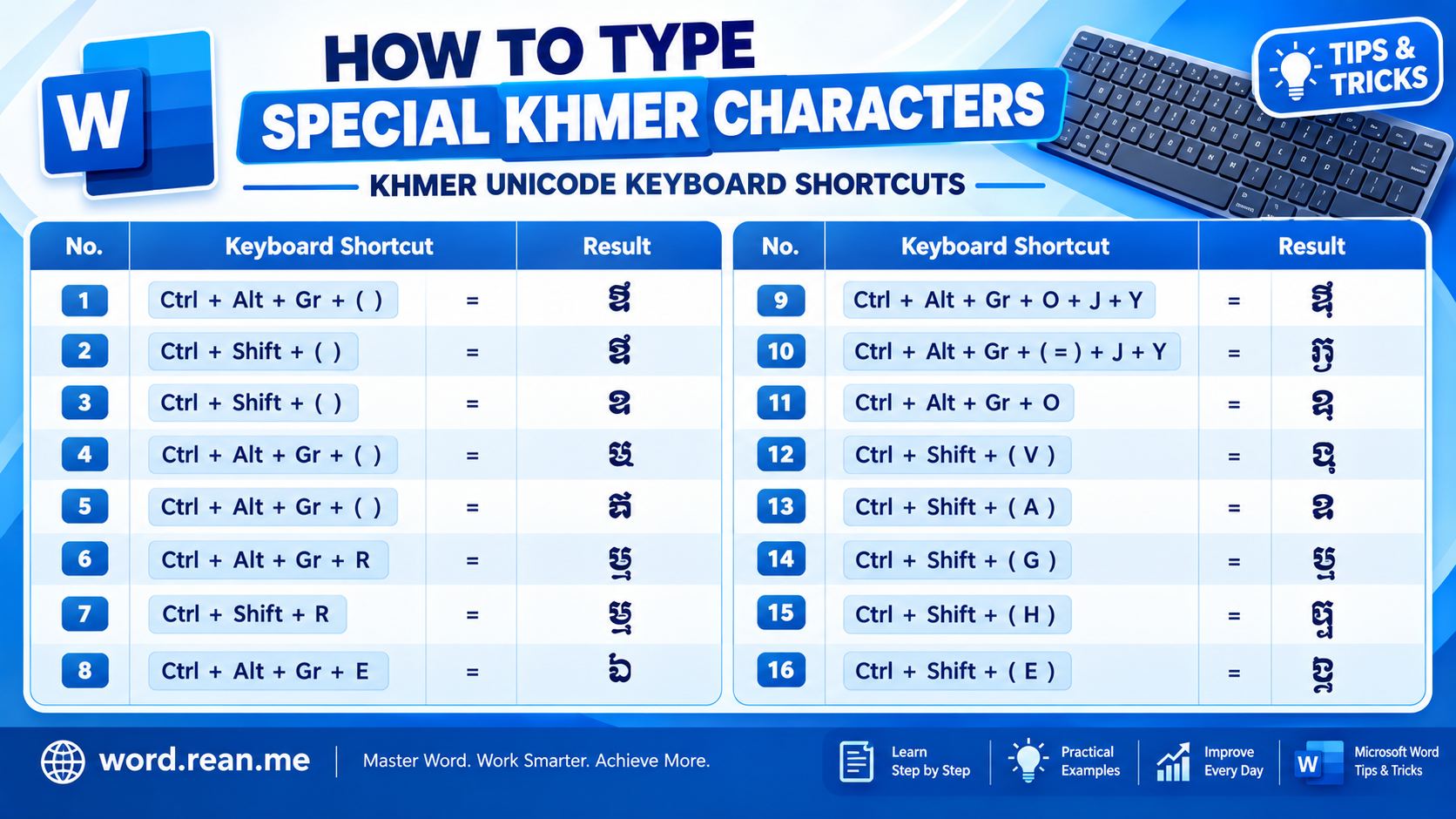
Many beginners stop typing and search on Google to copy and paste these characters! Stop copy-pasting! Today I show you complete secret keyboard shortcut guide how to type all special Khmer characters easily on your keyboard!

1. Quick Keyboard Shortcut Table for Special Khmer Characters
Here is the quick cheat sheet table for typing special Khmer characters and independent vowels (ស្រៈពេញតួ):
| Special Khmer Character | Character Name | Keyboard Shortcut Keys |
|---|---|---|
| អ | ស្រៈ អ | Shift + ] |
| អា | ស្រៈ អា | AltGr + [ |
| ឣ | ស្រៈ អា (ចាស់) | AltGr + ] |
| ឝ | អក្សរ ឝ | AltGr + ] |
| ឞ | អក្សរ ឞ | Press ] |
| ឨ | ស្រៈ ឨ | Press - (Minus key) |
| ឫ | ស្រៈ ឫ | AltGr + R |
| ឬ | ស្រៈ ឬ | Shift + R |
| ឭ | ស្រៈ ឭ | AltGr + E |
| ឮ | ស្រៈ ឮ | Press \ (Backslash key) |
| ឯ | ស្រៈ ឯ | Shift + \ (Shift + Backslash) |
| ឱ | ស្រៈ ឱ | AltGr + O |
| ឳ | ស្រៈ ឳ | AltGr + O + j + y |
| ឵ | សញ្ញា ឵ | Press = + j + y |
2. Step-by-Step: How to Type Each Group
Group 1: Typing ឫ, ឬ, ឭ, ឮ, ឯ (Independent Vowels)
- ឫ (Ry): Hold
AltGr+ pressR - ឬ (Ryy): Hold
Shift+ pressR - ឭ (Ly): Hold
AltGr+ pressE - ឮ (Lyy): Press
\(Backslash key next to Enter key) - ឯ (Ae): Hold
Shift+ press\
Option key!Group 2: Typing ឱ, ឳ, ឨ (Complex Independent Vowels)
- ឱ (Voo): Hold
AltGr+ pressO - ឳ (Qu): Press
AltGr + O, then pressj, then pressy - ឨ (Uk): Press
-(Minus symbol key)
Group 3: Typing Rare Khmer Symbols (ឝ, ឞ, អ, អា)
- អ: Hold
Shift+ press] - អា: Hold
AltGr+ press[ - ឝ: Hold
AltGr+ press] - ឞ: Press
]key directly without Shift
💡 Quick Tips Summary
- Right Alt (AltGr): Always use Right Alt key for special layer characters like ឫ, ឭ, ឱ.
- Backslash Key (
\): Types ឮ directly, andShift + \types ឯ. - Font Display: If characters look like blank square boxes (
□), change font to Khmer OS Battambang or Kantumruy Pro.
🔗 Related Resources & Tools:
- ⌨️ How to Type Khmer Unicode: Complete Keyboard Guide & Subscript Rules
- 🔤 How to Set Default Font (Khmer Unicode & English) in MS Word
- 📄 Khmer Unicode OS KH Auto Font Free Download
- 📥 Download Free Khmer Unicode Fonts & PDF Guides
- 🌐 KhmerTyping+ Online Tool
- 🌐 TypingHero - English & Khmer Typing Practice
Hope this quick guide helps you type special Khmer characters fast without copy-pasting anymore! Enjoy typing Khmer Unicode!

Rean Computer 101
Sharing step-by-step Microsoft Word tutorials, Khmer document formatting guides, office templates, and productivity keyboard shortcuts.